Music library · Format guide
Can you make a CD rip 24-bit / 96 kHz—and what changes?
A 24-bit / 96 kHz file can be made from a CD rip, but the method matters. Learn what ordinary sample-rate conversion does, how AI estimates a high-frequency extension, and what you can listen for.
If you own a CD collection, you may wonder whether you can make a 24-bit / 96 kHz version from a CD rip—and whether that gives you a useful new way to enjoy your music. You can create a file with those specifications, but the process determines what it contains. Ordinary sample-rate conversion changes how audio is represented; an AI upscaler estimates an additional high-frequency extension from patterns in the available music.
What is in a CD rip?
Standard audio CDs store two-channel audio at 16-bit / 44.1 kHz, as described in dBpoweramp’s CD-ripping guide. A lossless rip preserves the audio samples read from the disc. If your goal is to keep a digital library copy, a verified CD rip is a valuable source to retain as-is; converting its file format or sample rate does not turn it into the original studio master.
The sample rate describes the number of samples per second. Bit depth describes the precision of the sample values. These numbers tell you about the digital format, not by themselves how a recording was mastered or whether you will prefer how it sounds.
What does sample-rate conversion change?
A sample-rate converter recalculates samples so a file can use a different rate, for example to meet a project or playback requirement. A high-quality converter filters the signal as part of that process. The output file can contain more samples per second, but ordinary conversion does not infer a new performance or add musical detail that was not represented in the source.
If a device or production workflow requires 96 kHz, conversion may be the right tool for that job. If you are simply organizing a music collection, there is usually no need to convert a compatible 44.1 kHz CD rip before listening or archiving it.
What does a 24-bit / 96 kHz label tell you?
It tells you the output file’s sample rate and bit depth. It does not reveal whether the source was originally captured at that resolution, whether it came from a different master, or whether the listener will prefer it. A larger specification can be useful for particular workflows, but it is not a sound-quality score on its own.
The same distinction applies when converting lossy audio to FLAC: FLAC can preserve the decoded samples, but it cannot restore information discarded when the lossy file was made. For your personal library, keep the best source you have and treat any converted or processed file as a separate version.
How does AI audio upscaling differ?
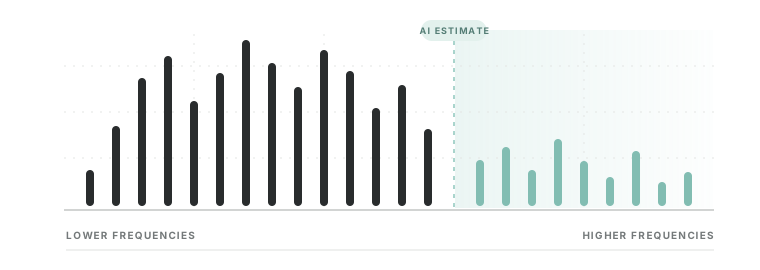
An AI upscaler takes a different approach from ordinary resampling. It analyzes patterns in the available audio—including the structure and relationships present in lower frequencies—and estimates a plausible high-frequency extension. Resoluna uses that estimated extension to create a 24-bit / 96 kHz FLAC that you can listen to alongside your original.
That gives a listener with a CD collection a way to create and compare a new 24-bit / 96 kHz version of music they already own, without finding a separate high-resolution master. The extension is an estimate, not the original missing signal recovered from that master. It is a new interpretation to audition, and you decide whether it suits the track and your listening setup.
How to make a 24-bit / 96 kHz listening version
- Keep your original rip and choose one compatible WAV or FLAC file at 44.1 or 48 kHz. The current beta accepts files up to 50 MB and 15 minutes; the output is also capped at 50 MB, so a shorter track is a good first test. Check the current limits before uploading.
- Open the Resoluna beta, choose an available access option, and select or drop the file. The upload starts automatically; wait for processing to finish.
- Download the 24-bit / 96 kHz FLAC and keep it separate from the original. Compare the same passage at similar playback levels using our step-by-step listening guide.
| Your goal | Approach | What you get |
|---|---|---|
| Keep a CD rip in your library | Lossless rip to FLAC or WAV | A digital copy of the samples read from the disc |
| Meet a playback or project rate | Sample-rate conversion | A file represented at the required sample rate |
| Explore an extended listening version | Resoluna AI audio upscaling | A 24-bit / 96 kHz FLAC with model-estimated high-frequency detail |
Will an upscaled CD rip sound better?
It may sound different, but a higher sample rate or a visible extension does not guarantee an audible improvement. Whether you prefer the result depends on the track, the processing, your hearing, and your playback system. Keep both files and compare the same passage at a similar playback level to decide which version you enjoy.
A 44.1 kHz file has a theoretical upper frequency limit of about 22.05 kHz; a 96 kHz file can represent frequencies up to about 48 kHz. Real recordings and playback systems have their own bandwidth limits. Much of the range above the CD limit is beyond typical adult hearing, so seeing energy there on a spectrogram does not establish that it is audible or sounds better. A generated extension is not proof of what the original master contained. See a before-and-after spectrogram of a drum excerpt for one example.
Which option fits what you want to do?
- Keep a CD-quality library copy: rip to a lossless format such as FLAC and keep that source unchanged.
- Meet a technical sample-rate requirement: use sample-rate conversion for the required format.
- Try a new listening version: use AI upscaling to audition an estimated extension from a compatible source.
If you are ripping a collection, see our practical guide to ripping CDs to FLAC. For archival work, consult established preservation guidance such as IASA’s technical guidelines; keep the source recording and identify processed files as derivatives.
Explore an estimated extension from your own music
Resoluna accepts compatible 44.1 or 48 kHz WAV and FLAC files and creates a 24-bit / 96 kHz FLAC for you to audition. Keep the original and decide whether the generated version adds something you enjoy.